Rewind. Guess.
Lose your place.
SYNCED BILINGUAL CAPTIONS FOR YOUTUBE
Understand YouTube videos
in your language.
Stay with the idea.
Understand YouTube videos with original captions and a translation side by side. Even when subtitles are missing.
Connect with Google and start with 30 free minutes each month. Shared with your web usage. No paid plan required.
Public YouTube videos No microphone Starts only when you ask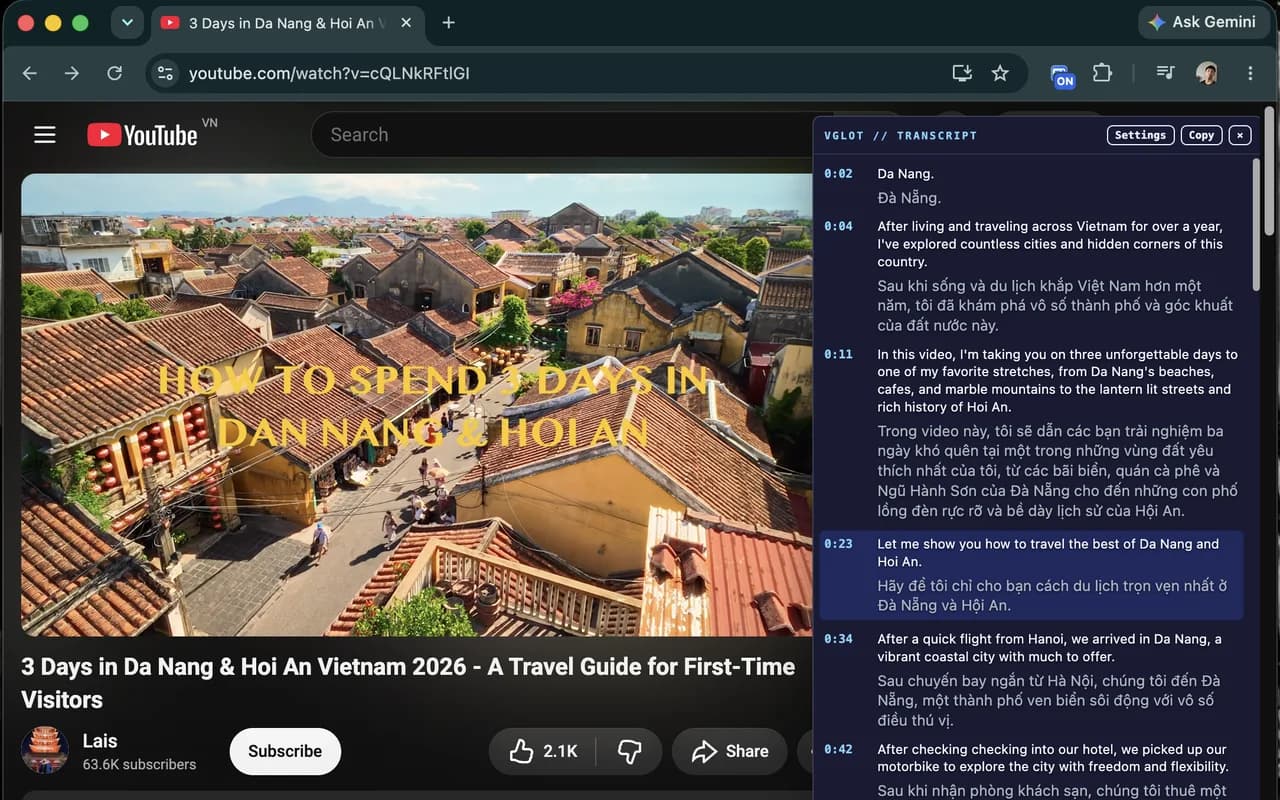
KEEP THE CONTEXT
Don’t let a language barrier
interrupt a good video.
A tutorial worth finishing. A lecture that explains something clearly. An interview you want to understand. Read the translation, check the original wording, and continue watching.See how to get startedMADE FOR VIDEOS WORTH FOLLOWING
LecturesTutorialsInterviewsLanguage lessonsPodcastsProduct demosConference talksDocumentariesWebinarsCourses
🇬🇧EnglishEN🇻🇳VietnameseVI🇪🇸SpanishES🇫🇷FrenchFR🇩🇪GermanDE🇯🇵JapaneseJA🇰🇷KoreanKO
THE PROBLEM
Miss one phrase.
Lose the whole idea.
Fast speech, unfamiliar terms, and inaccurate captions can turn a useful video into repeated rewinding. VGLOT keeps the spoken words and translation together in one panel.Read the words.
In your language.
THE EXPERIENCE
Read comfortably.
Keep watching.
Choose your languages, place the transcript where it feels comfortable, and follow the conversation without leaving YouTube.01 · FOLLOW
Follow both languages at once.
See the original speech alongside its translation. When a phrase or technical term catches your attention, the source text is right there to compare.
- Captions load in 60-second playback intervals
- Original speech and translation side by side
- Move the panel anywhere in the browser window
02 · CHOOSE
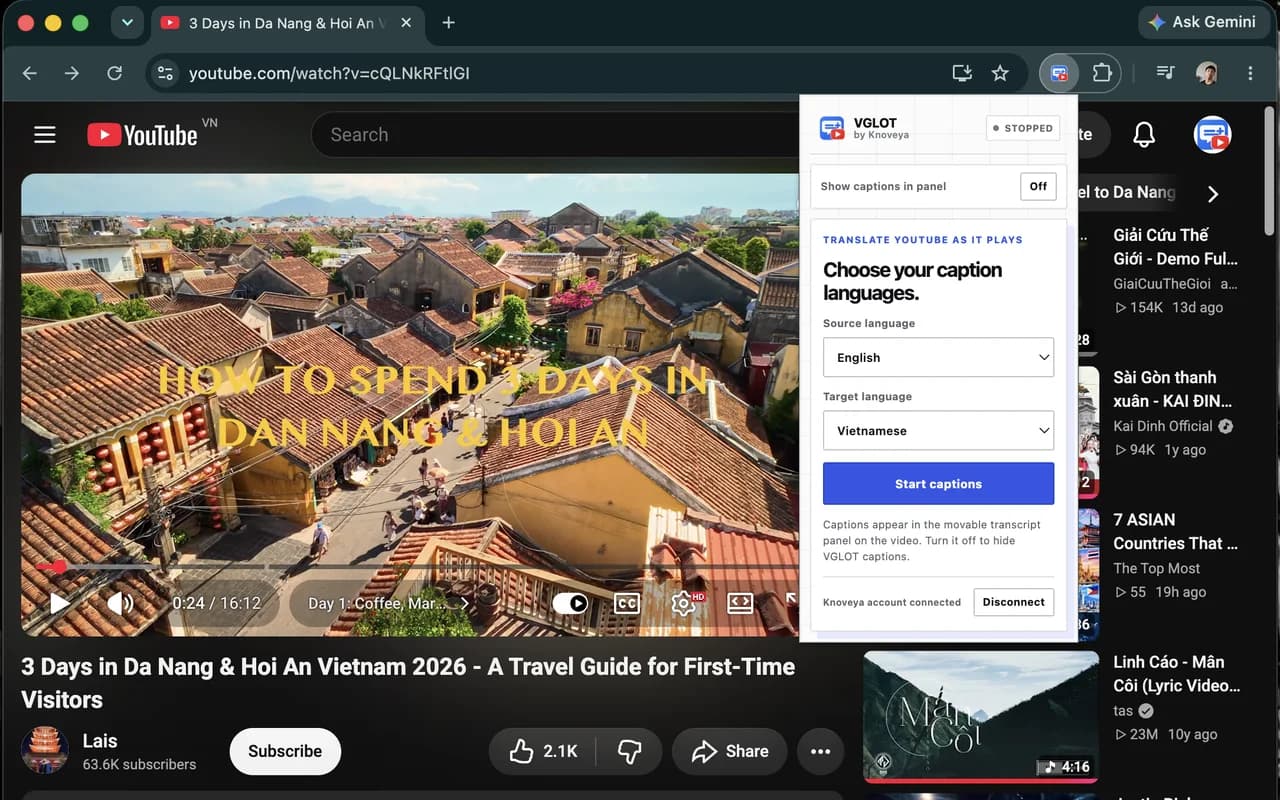
More languages. More videos within reach.
No subtitles? VGLOT creates captions from the video’s audio. The Chrome extension offers 61 explicit Source options plus Auto detect and 109 Target options. Choose the spoken language and the language you want to read, then start captions at your playback position.
- 61 Source choices plus Auto detect
- 109 Target choices in the extension
- Explicit Source guides recognition; Auto detects supported languages only
- Expanded choices apply to the extension; the web language list is unchanged
03 · CUSTOMIZE
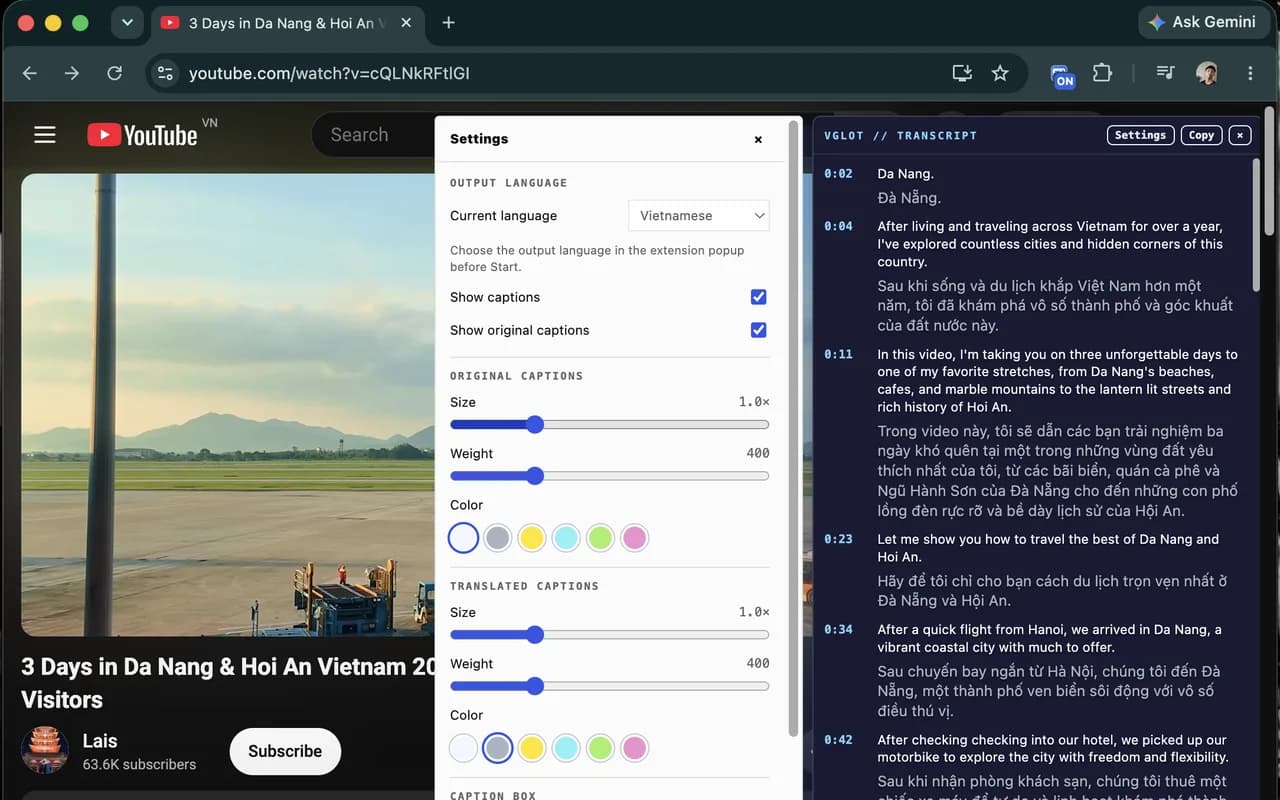
Make the captions comfortable to read.
Adjust the size, weight, and color of both languages from the panel settings.
- Show or hide original captions
- Choose where the panel sits
- Keep the video visible while you read
04 · REVISIT
Return to the parts that matter.
Prepared intervals are saved privately for your account and language pair. Reopening a ready interval reuses it without extra processing quota. The web workspace still processes complete videos into your Library.
- Once ready, captions follow pauses, seeking, and playback speed
- Click a timestamp to revisit a moment
- Preparation starts only when you request it
WHO IT’S FOR
Good ideas don’t all come in your language.
Follow useful YouTube videos with the original words and a translation side by side—even when subtitles are missing.
Professionals & Researchers
The insight you need might be in another language.
Understand talks and interviews, compare the original words with their translation, and return to the moments that matter.
Developers & Self-Learners
Focus on the lesson, not the language barrier.
Follow tutorials and lectures with bilingual captions. Keep unfamiliar terms close to their original wording as you learn.
Language Learners
Hear it. Read it. Understand it in context.
Watch with both languages together. Click a timestamp to hear a phrase again and see how it’s used.
Less guessing what was said. More understanding what matters.
Explore VGLOTHOW IT WORKS
From listening to understanding
in three simple steps.
Install VGLOT and connect with Google. Choose two languages, then start captions at the part you want to watch.- 01Install and connect your accountAdd VGLOT to Chrome, then Connect with Google. Free includes 30 minutes per UTC month, shared with the web workspace.
- 02Choose source and target languagesOpen a public YouTube watch page. Select the language being spoken and the language you want to read.
- 03Start, wait, then follow playbackVGLOT reuses ready captions or prepares the current 60-second interval. Version 0.4.1 adds first-minute captions in two parts, starting with the first 15 seconds. While playing, VGLOT can prepare one following interval. Seek to start from another part.
PRIVACY, IN PLAIN LANGUAGE
Clear about what happens to your audio.
After you press Start, Knoveya temporarily processes the public video’s audio with Deepgram and sends transcript text to Gemini for translation. Extension intervals are cached privately for your account and language pair; complete videos processed on the web are saved in your Library. Temporary audio files are deleted after processing. The extension does not capture tab audio or use your microphone.HELPFUL ANSWERS
A little clarity before you start.
Does the video need existing subtitles?
No. VGLOT can create captions from the video audio.
Will captions appear instantly?
Not for unprepared audio. VGLOT prepares captions in 60-second intervals. With version 0.4.1, captions for the first 15 seconds of minute one can appear while the remainder prepares. Other minutes keep the existing flow. VGLOT can prefetch one next interval while playing. Ready captions for your account and language pair are reused. Processing time and accuracy vary; there is no live transcription fallback.
What are synced captions?
Prepared captions use timestamps to follow the video as you pause, seek, or change speed. In version 0.4.1, the first part of minute one can appear while the remainder prepares.
Do I need an account or a paid plan?
Connect with Google. A paid plan is optional: Free includes 30 caption minutes per UTC calendar month, shared between the extension and web workspace. Standard and Premium offer larger allowances.
How is processing quota used?
The extension charges newly completed 60-second intervals, including completed prefetch and silent intervals. A shorter final interval rounds up to one minute. Ready captions are reusable after quota exhaustion; failed intervals are refunded. The web workspace still charges whole-video processing.
Where does VGLOT work?
On public YouTube watch pages in Chrome. Shorts, livestreams, and private videos are not supported. If processing fails, check the error and retry; captions do not switch to live capture.
Ready for your first video?
Install the extension, open its popup, and Connect with Google. Start Free with 30 minutes per month, or choose more time below.Open a public YouTube video, choose Source and Target languages, then press Start. Wait for the first captions, then follow the synchronized bilingual transcript.
Stop prevents new interval requests; accepted work may finish and be cached. Hiding the panel does not stop processing. Use the web workspace when you want a complete video transcript in your Library.
Compare Free and paid plansPRICING
Choose the time that keeps ideas moving.
Start Free with Google sign-in. Choose more caption time when you need it; your monthly allowance is shared between the extension and web workspace.Translation times vary by video and service availability. Upgrade to Standard or Premium for more caption minutes.$0 / month
For your first videos and occasional viewing.
30 caption minutes / monthGeneral translation models
 SiliconFlow
 GLM-4 FLASH
 HY-MT
HY-MT
- Shared with your web usage
- All supported extension languages
- Movable bilingual transcript panel
- Resets each UTC calendar month
- Google sign-in required
$9.99 / month
Launch pricePlanned regular price $12.99
For courses, interviews and long-form videos you want to follow.
400 caption minutes / monthAdvanced translation models
 DeepSeek V4.1 Flash 1017
 Qwen 3.5 Plus
 Gemini 3 Flash
 GPT-6 Luna
- GLM-4.7
 DeepL Pro
- All supported languages
- Movable bilingual transcript panel
- Monthly quota reset
- Manage or cancel in Polar
$24.99 / month
Launch pricePlanned regular price $29.99
For frequent research and long-form viewing.
1,000 caption minutes / monthTop-tier translation models
- GPT-6.1 Sol
- Gemini 3.1 Pro
 Kimi K2.6
 Claude Sonnet 5.5
- GLM-5.2
Advanced translation models
- DeepSeek V4.1 Flash 1017
- Qwen 3.5 Plus
- Gemini 3 Flash
- GPT-6 Luna
- GLM-4.7
- DeepL Pro
- Everything in Standard
- 2.5× monthly caption time
- Manage or cancel in Polar

KEEP THE IDEA IN VIEW
Your next useful video
doesn’t have to be in your language.
Install VGLOT and follow more of the tutorials, talks, and conversations you want to watch. Add to ChromeConnect with Google. Start Free with 30 minutes per month.